


Госуслуги Дом
3.872.00 Reviews
App Specs
- Version
- 4.9.0
- Updated On
- License
- Free
- Downloads
- 5,000,000+
- Developer
- Оператор информационной системы
- Categories
- House & Home
- Platform
- Android, iOS
Screenshots
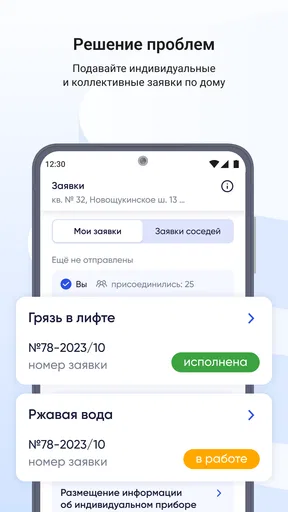
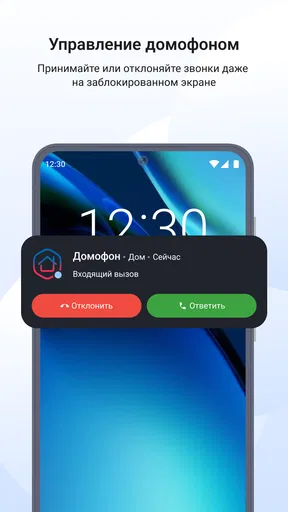
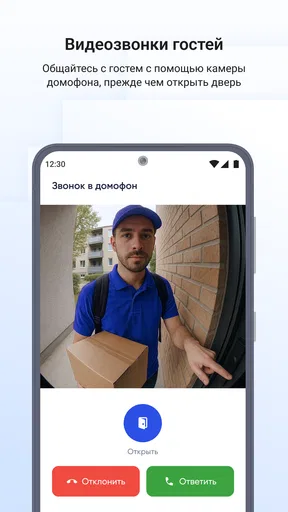
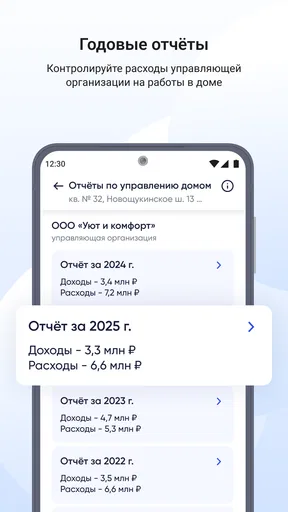
 Analysis by AppCompare
When a housing issue lands in the middle of an ordinary day, I want to know where to start, what information to gather, and whether I can move the matter forward without making a string of calls. That is the practical question I bring to Госуслуги Дом. It is a free House & Home app from Оператор информационной системы, built around housing and communal-services tasks rather than the wider range of errands people may associate with government-service apps.
For a resident, the useful test is not whether an app can make every problem disappear. It is whether it helps turn a vague concern—a bill, a building issue, or uncertainty about a housing process—into a clearer next step. I would treat this as a place to begin and organize that work, while staying prepared for the possibility that a particular issue will still need another channel or an in-person visit.
From a housing question to a next step
The app is free, and its Everyone age rating makes it broadly accessible. It has been available since Dec 19, 2024, and version 4.7.0 is the current release. Its average rating is 3.6 from around 62,000 ratings, with over 5 million installs. I read those figures as signs of a widely used service with mixed experiences, not as a guarantee that every local housing task will be equally smooth.
Starting with the problem, not the menu
If I were opening the app because something had gone wrong at home, I would first describe the issue to myself in plain terms: Is this about a communal-service charge, a building or housing concern, or a document or administrative step? That small distinction matters. It helps me avoid clicking through unrelated areas and gives me a better chance of finding the right route without treating the app as a general-purpose government portal.
The app’s focus is its main advantage over a broad services directory: I can approach it with a housing question in mind. The trade-off is that a user who wants unrelated public services may find the scope too narrow. In that case, the wider Госуслуги service or the responsible organization’s own channel may be a more direct starting point.
Turning a concern into a usable request
When I am dealing with a recurring household issue, I try to gather the basic facts before opening any service: what happened, when I noticed it, and which part of the home or bill is involved. This is a practical habit, not a special app feature. Clear notes make it easier to choose a relevant category and explain the situation consistently if the process later moves to a person or organization outside the app.
For a bill-related question, I would keep the bill or account details nearby and compare the item I am concerned about with the information shown in the app. For a building problem, I would write a short description rather than relying on a vague label such as “something is broken.” A concise account is easier to reuse if I have to follow up by phone or in person, and it reduces the chance of losing the important details between steps.
Worth Reading Before You Choose

Flipboard Shows What News Apps Must Do Beyond the Feed

Switching to Android Auto Means Rethinking Your Driving Routine

Google Calendar Makes a Crowded Week Easier to Manage

Ludo King Makes the Most of the Minutes Between Plans

Baby Panda World Brings Quick Play to Modern Phones, but Its Game Library Feels Busy

ESPN’s Live Game View Makes Following Close Games Easier
When the process hands off to someone else
A housing app can help with the first leg of a task, but the final decision may belong to a utility provider, building manager, or government office. I would not assume that sending or viewing something in the app means the underlying issue is already resolved. The useful question is what the next responsible party needs from me, and whether I have a clear record of the information I entered or the response I received.
That handoff is where I would be especially careful. I would save relevant reference details in a place I can find again and note any promised next step, rather than relying on memory. If the app points me toward a physical visit, I would check what information or documents are required before leaving home. This simple preparation is more valuable than making repeated attempts through different menus without knowing whether the case has moved forward.
Everyday use and the point of comparison
Imagine noticing a communal-service charge that looks unfamiliar while checking household expenses. I would open the app to see whether the issue belongs in its housing workflow, gather the bill details, and make a brief note of the exact charge and billing period. If I can take the next step there, I have a focused place to begin; if the matter needs a provider’s explanation, I can carry the same details into that conversation instead of starting over.
Compared with calling an organization immediately, an app-based route can be easier when I want to review information at my own pace or keep a task connected to other housing matters. Compared with searching the web, a purpose-built service can reduce the guesswork about where a housing issue belongs. But a phone call may still be better when the situation is urgent, complicated, or hard to explain through a structured process. I see the app as a useful first stop, not a replacement for every human conversation.
What makes the experience less dependable
The overall rating suggests that experiences are not uniformly positive, so I would install it with realistic expectations. A clean-looking interface cannot compensate for an issue that depends on local service availability, an organization’s response, or a task that still requires a physical visit. If I cannot find a relevant route, I would avoid submitting the same concern repeatedly in slightly different ways; that can make follow-up harder rather than clearer.
Language can also add friction for people who are not comfortable with the wording used in the app. If a label is unclear, I would pause and check what the task is asking before sharing personal or housing details. For a complicated matter, getting help from someone who understands the process may be wiser than guessing. The app is most helpful when the user can identify the issue well enough to choose an appropriate path.
Who I would recommend it to
I would suggest trying it if you live in a home where communal-service and housing questions come up, prefer handling routine steps on a phone, and are comfortable keeping track of follow-up details. It may be particularly useful for people who want a dedicated starting point for housing matters rather than searching through unrelated services each time.
I would not make it the only option for someone who needs immediate help, has a highly unusual dispute, or cannot comfortably use a digital process. In those cases, contacting the responsible organization directly—or visiting the relevant office when required—may be more reliable. The same applies if your goal is to manage public services well beyond housing: a broader government-services app may suit that need better.
Getting more value from each attempt
My practical advice is to treat each housing task as a small case file. Before starting, note the issue, the relevant date or billing period, and any detail that helps distinguish it from other household concerns. After taking a step, keep track of what happened and what remains unresolved. This is not glamorous, but it makes a later handoff much easier and prevents the common cycle of repeating the same explanation to different people.
I would also separate “I have submitted or checked something” from “the problem is fixed.” Those are different outcomes. If a matter appears to stall, use the information already gathered to decide whether to follow up through the app, contact the responsible service, or make an in-person visit. That approach keeps the app in its proper role: a practical organizer and access point, rather than a promise that every housing problem ends on the screen.
Getting Started with Госуслуги Дом
First things first, downloading Госуслуги Дом is a straightforward process. You can find it on both Android and iOS platforms, and it’s free of charge. After installing, you’ll need to set up an account. The registration process is pretty intuitive, but make sure you have your personal info handy—like your ID and phone number—because you’ll need it to verify your identity.
User Interface and Navigation
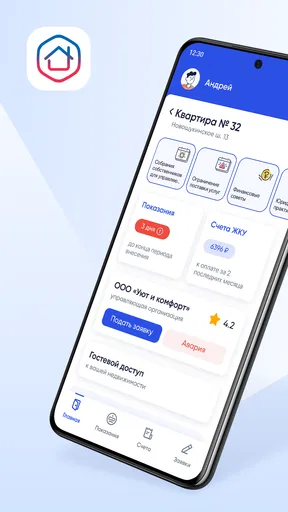
Once you're in, the user interface is clean and user-friendly. The app’s design is simple, which I appreciate because it makes navigation a no-brainer. The main dashboard presents you with several categories, such as utilities, housing, and legal services. Everything is laid out neatly, so whether you’re tech-savvy or not, you won’t find yourself lost in a sea of options.
Features That Stand Out
The app is packed with features designed to streamline your governmental interactions. Here are a few highlights:
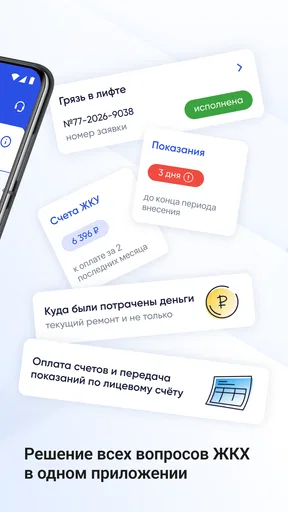
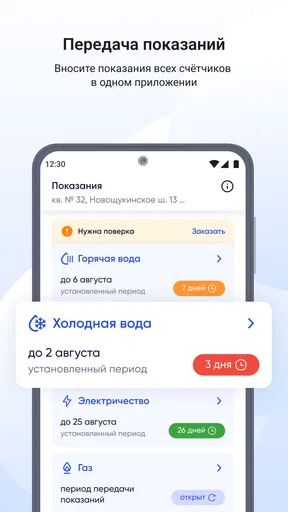
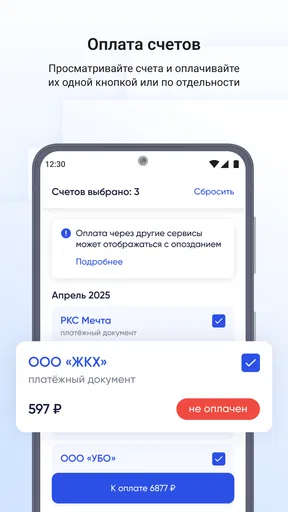
- Utility Payments: Paying your utility bills has never been easier. You can manage everything from water and electricity to gas and waste disposal. The app even sends reminders, so you don’t miss a payment.
- Document Requests: Need a document? Whether it’s a birth certificate or a property document, you can request it through the app. This feature saves a ton of time that you’d otherwise spend waiting in lines.
- Appointment Scheduling: If you need to visit a government office, you can schedule an appointment directly in the app. This means no more long waits, as you can plan your visit to fit your schedule.
Performance and Reliability
One thing I always worry about with these kinds of apps is performance. I’m happy to report that Госуслуги Дом runs smoothly. I haven’t experienced any crashes or major bugs, which is a huge relief. The app updates regularly, which helps keep things running without a hitch.
Security and Privacy
Dealing with sensitive information means security is a top priority. The app uses encryption to protect your data, and there’s an option to enable two-factor authentication for added security. Privacy policies are clearly outlined, which is reassuring. I felt safe using the app, which is crucial when handling such personal data.
What Could Be Improved?
While the app is generally fantastic, there are a couple of areas that could use a little polish. Sometimes the translations in the app could be clearer for non-native speakers. Also, while the app covers a lot of services, there are still some that require visiting a physical location. Expanding the range of services available would make it even more indispensable.
In conclusion, Госуслуги Дом is a solid choice if you're looking to simplify your interactions with government services. It’s user-friendly, efficient, and secure. If you’re tired of standing in never-ending lines or dealing with complicated processes, give this app a shot. It’s designed to make your life easier, and in my experience, it delivers on that promise.
Pros
- User-friendly interface for easy navigation.
- Quick access to essential government services.
- Secure login with multiple authentication options.
- Comprehensive help and support section.
- Regular updates with new features and improvements.
Cons
- Limited offline functionality.
- Occasional bugs in the notification system.
- Requires stable internet for optimal performance.
- Some features may be region-specific.
- Installation can take up significant storage space.
FAQs for Госуслуги Дом
What is Госуслуги Дом, and what does it offer?
Госуслуги Дом is a comprehensive application designed to streamline and manage household-related government services in Russia. It provides users with easy access to a wide range of public services, including utilities management, property registration, and tax information. The app aims to simplify the process of interacting with government entities, making it more convenient and efficient for users.
Is Госуслуги Дом available on both Android and iOS platforms?
Yes, Госуслуги Дом is accessible on both Android and iOS devices. The app can be downloaded from the Google Play Store for Android users and the Apple App Store for iOS users. This ensures that a wide range of users can benefit from its features, regardless of their preferred mobile platform.
How does Госуслуги Дом ensure the security of my personal data?
Госуслуги Дом prioritizes the security and privacy of its users' personal data. The app employs advanced encryption protocols and adheres to strict data protection regulations. Users can also enable additional security features such as two-factor authentication to further safeguard their information when accessing sensitive government services.
Are there any costs associated with using Госуслуги Дом?
Downloading and using Госуслуги Дом is free of charge. However, some specific services accessed through the app may incur fees, depending on the nature of the service and government regulations. Users are advised to check for any applicable fees within the app when using certain features.
What should I do if I encounter issues while using Госуслуги Дом?
If you experience any problems while using Госуслуги Дом, the app offers a comprehensive help section with FAQs and troubleshooting tips. Users can also contact customer support directly through the app for personalized assistance. This ensures that any issues are addressed promptly, enhancing the overall user experience.


